
BSS B2B Wholesale Pricing Review: What a Full Setup Really Costs
 Official Shopify Partner
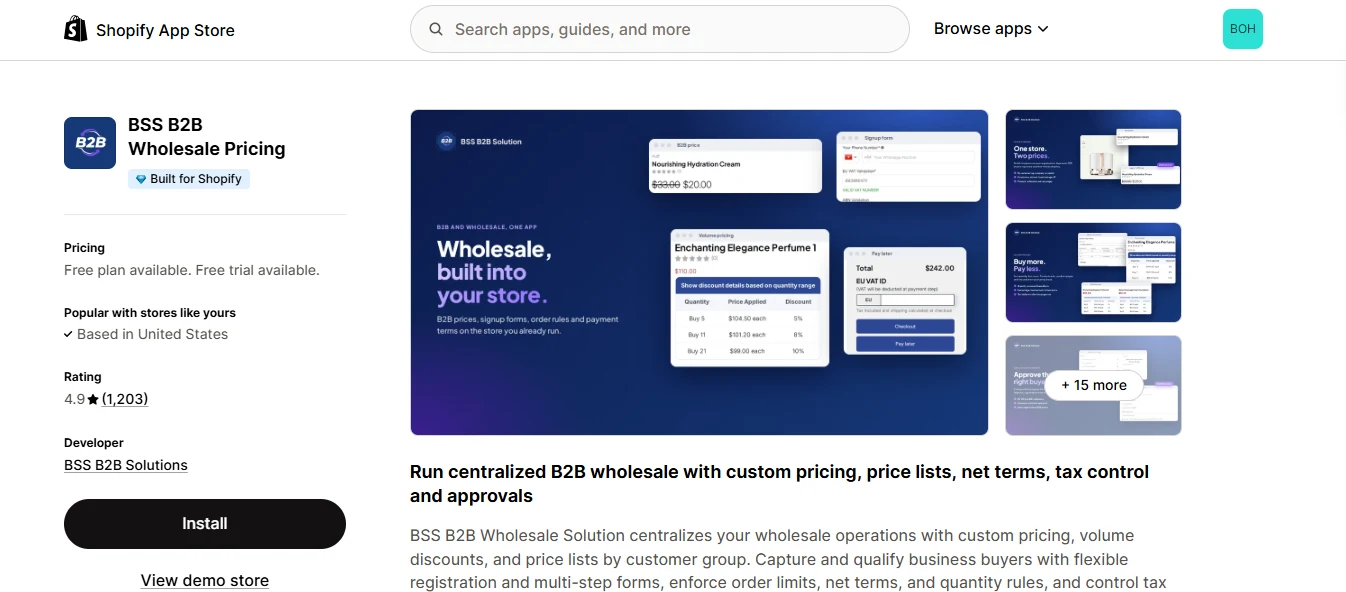
With 4.9 stars from 1,194 reviews, you’d expect BSS B2B Wholesale Pricing to cover your entire wholesale setup. It covers a lot: prices for each buyer group, sign-up forms that check VAT and ABN numbers, order minimums and payment terms.
But two things most wholesale stores need aren’t included. Hiding prices from guests requires a second app, BSS B2B Lock. Accepting quote requests requires a third, BSS B2B Quote. Each has its own plan, trial, and bill.
That changes the price you’re really comparing. BSS’s listing starts at free, but a store on Basic Shopify that needs net terms, hidden prices, and quotes pays $77.99 a month across three apps. Add retailer price lists and POS pricing on a larger store, and the total reaches $187.99.
So the real question isn’t whether BSS is good. It’s whether its depth is worth managing three apps, or whether one app could do the same job.
In this review, I cover what BSS does well, where it falls short, what users say about it in 2026, and what all three apps cost together. I also compare it with BMT B2B Wholesale Pricing, which handles pricing, hidden prices, and quotes in one app, all on its $29.99 Advanced plan.
TL;DR: BSS B2B Wholesale Pricing Review
- What it covers: pricing, signups, order rules, net terms, and tax in one app.
- Strongest feature: VAT and ABN checks at signup, plus tax-exempt checkout.
- Real starting plan: Advanced at $49, where net terms and order minimums start.
- Top-plan features: per-retailer price lists and POS pricing require Platinum at $99.
- Sold separately: hidden prices require BSS B2B Lock, and quotes require BSS B2B Quote.
- Currency: converted for display only; checkout stays in your store currency.
- What reviewers praise: responsive support staff, often thanked by name.
- What goes wrong: theme code conflicts that can break pages on busy stores.
- Want one app and one bill? BMT covers the same ground on one $29.99 plan.
BSS B2B Wholesale Pricing Review: What You Get vs What You Don't
BSS B2B Wholesale Pricing covers much more of a trade setup than a pricing-only app. You get signups, order rules, payment terms, and tax handling, not just discounts.
The catch is how it’s packaged: the most useful features are on the top plan or in sister apps, and the whole setup runs through your theme’s code.
What you need | In BSS B2B Wholesale Pricing? |
|---|---|
Prices by customer or tag | Every plan, 1 rule on Free |
Quantity breaks | Essential and up |
Sign up with approval | Every plan, 1 form on Free |
Tax ID checks at signup | Essential and up |
Order minimums and maximums | Advanced and up |
Quantity increments | Advanced and up |
Net terms | Advanced and up |
Tax exemption with a VAT ID | Advanced and up |
Variant-level and per-customer price lists | Platinum only |
Shopify POS pricing | Platinum only |
Checkout in the buyer's currency | Not available, display only |
Hidden prices for guests | Separate app: BSS B2B Lock |
Quote requests | Separate app: BSS B2B Quote |
What you get
- Your own price for each customer or group
Set a fixed price, a percentage off, or an amount off by customer or tag. Buyers see their price alongside the crossed-out retail price.
- The type you choose matters more than it might seem
A percentage adjusts when you change your retail price, while a fixed price stays the same. BSS recommends fixed prices for B2B to protect your margins, and I agree for accounts with negotiated prices.
- A clear answer when rules overlap
If a customer belongs to two groups, BSS applies the price list or custom price first, followed by any quantity break, and then discount codes. Within each step, you rank rules from 0 to 99, with the lower number taking priority. Most pricing apps leave you to figure this out through trial and error.
- Volume tiers buyers can see
The product page displays a quantity-tier table, so buyers know how much they can save before adding more units.
- Order rules enforced in the cart
Set minimum or maximum quantities or amounts for each customer, tag, or product. If a cart falls short, the buyer sees a warning before checkout.
- Signups, terms and tax in one app
Signup forms collect tax IDs and wait for your approval. Net terms range from due on receipt to Net 90 and create draft orders. Prices can appear with tax, without it, or both.
What you don't get
- Prices in the buyer's own currency at checkout. BSS converts prices using Shopify's exchange rate for display, but the charge stays in your store currency.
- Hidden prices or quote requests in this app. You need BSS B2B Lock and BSS B2B Quote for those, each with its own plan.
- Retailer price lists below the top plan. Variant-level price lists, per-customer price lists, and POS pricing all require Platinum.
- Much on the Free plan. You get one custom pricing rule and one signup form on a live store.
- A setup that stays out of your theme. BSS uses theme code, so a custom theme may need a developer, and other apps can conflict with it.
- BOGO offers alongside net terms. In a September 2026 review reply, BSS's own team confirmed that its older BOGO module doesn't work reliably with Net Terms.
What Users Are Saying About BSS B2B Wholesale Pricing in 2026
BSS B2B Wholesale Pricing has 4.9 stars from 1,194 reviews, about as high as Shopify ratings get. That score tells you most merchants are happy, but not what goes wrong for the rest. So I read the 2026 reviews from both ends: the ten most recent five-star reviews and every one-star review posted this year.
Where BSS Earns Its Rating
- Steren, September (5 stars): "They still respond within 24 hours of ticket request." They also called the unlimited business price list "a steal of a deal."
- Vapequipment, October (5 stars): "When we came across functionality that was not available, their dev team was happy to develop this extra feature for us."
- Weesgaarddental, September (5 stars): They use the EU VAT exemption, and support ensured a free gift stayed at €0 during tax-exempt checkout, then recorded a test video to show it worked.
- CHATANI Japanese Tea, October (5 stars): "an approval process for B2B customers, wholesale pricing, and volume discounts." For them, that covers everything.
Most reviews follow a similar pattern: a specific problem, a named support person, and a fix. Across ten reviews, eight different BSS staff members are thanked by name.
Where It Goes Wrong
- Lyon Sport B2B, edited May (1 star): "our whole site crashed for multiple days because of the BSS code." They had to rebuild their theme from scratch, and support "kept repeatedly saying this issue was fixed when it wasn't." In a later update, they said BSS emailed several times asking them to revisit the review.
- MacExperience, September (1 star): A feature stopped working, and "Support told us that the solution would just be to 'avoid' that feature." In its reply, BSS explained that its older BOGO module doesn't work reliably with Net Terms.
- Bebea, April (1 star): They say they continued to be charged after uninstalling the app.
The same theme issue appeared in 2025, too. Inferno Body Jewelry wrote that "the app is too invasive to the theme's code and any small change can break your website."
Manufaktur Zartgefühl said the app "only works poorly and only on some themes" (translated from German).
My Hands-On Experience With BSS B2B Wholesale Pricing
BSS works through modules you turn on one at a time: net terms, order limits, quantity increments, custom order fields, and more.
Many require both an app setting and a block added to your theme. To show what that looks like in practice, I followed a new retailer’s journey, from applying for an account to paying on terms, and noted what each screen asks along the way.
- Building the Signup Form
The signup form builder takes you through four steps: basics, form editor, settings, and publish. You can ask for a phone number, company name, ABN, business license date, and even a copy of the license.
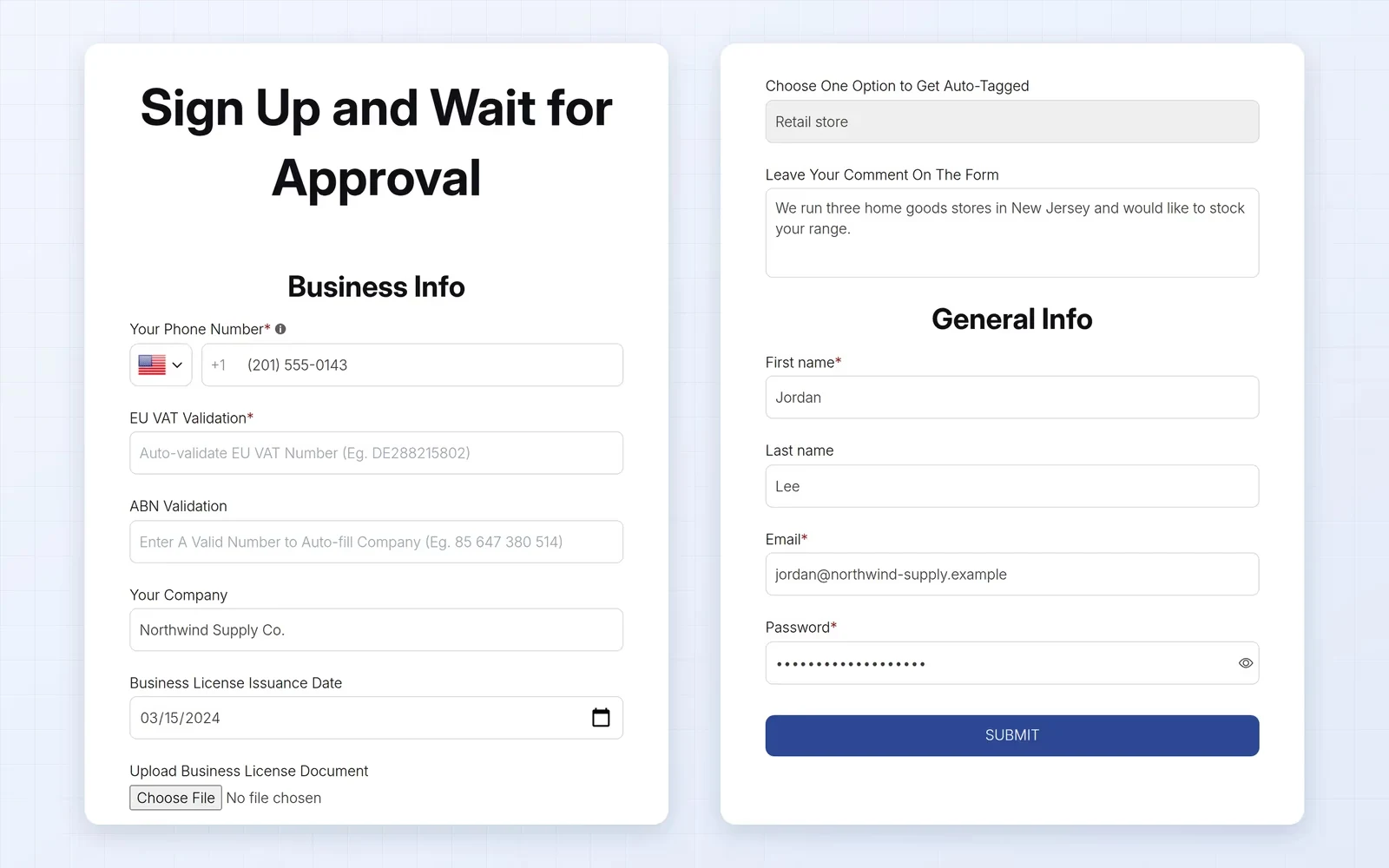
I’d only add fields you’ll actually check before approving someone. The license upload is useful if you sell to licensed trades.
On paid plans, you can also break a long form into steps, such as personal details first and company details second.
- Setting Prices With a Price List
On the Platinum plan, the price list editor is where you manage retailer-specific pricing. For each product, you can lower the price by a fixed amount or percentage, or apply a decreasing price, then enter the value.
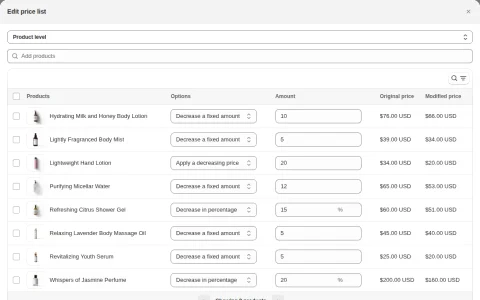
The column I’d rely on is the modified price. It shows the result beside the original, so you can catch a price below your margin before saving.
On lower plans, you set prices through custom pricing rules instead.
- Turning On Net Terms
Net terms require the most setup. First, you build a registration form for buyers who want to pay later.
Then you follow a "Make Net Terms live" checklist: save the rule, enable it, turn on the module, activate the app embed, and add the pay-later button to your theme.
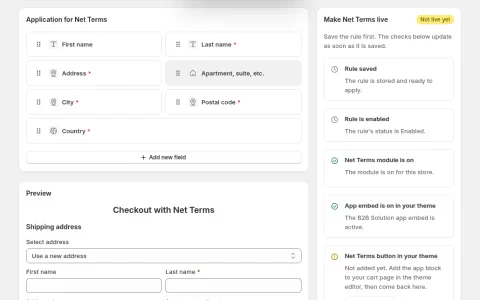
That checklist is the app’s most useful screen. It shows exactly which step is missing. It also highlights how much BSS depends on your theme, since buyers won't see the pay-later button until you add its block to your cart page.
The custom order fields module works the same way, and its screen says BSS will help for free if the fields don't appear.
- Placing an Order for a Buyer
If a buyer emails or calls in an order, you can create it from your Shopify admin with their custom price already applied. You can also add payment terms, apply tax exemption for exempt customers, and send the invoice from the same screen.
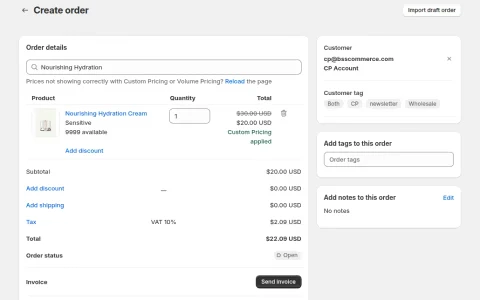
One line on this screen is worth noting: if custom or volume prices don't appear correctly, it tells you to reload the page. I’d check the price on every manual order before sending the invoice.
BSS B2B Wholesale Pricing Plans in 2026
BSS B2B Wholesale Pricing has a free plan and three paid plans, each with a 14-day free trial. Paying yearly saves 10%. Most stores also add one or both of BSS's sister apps, which I cover below.
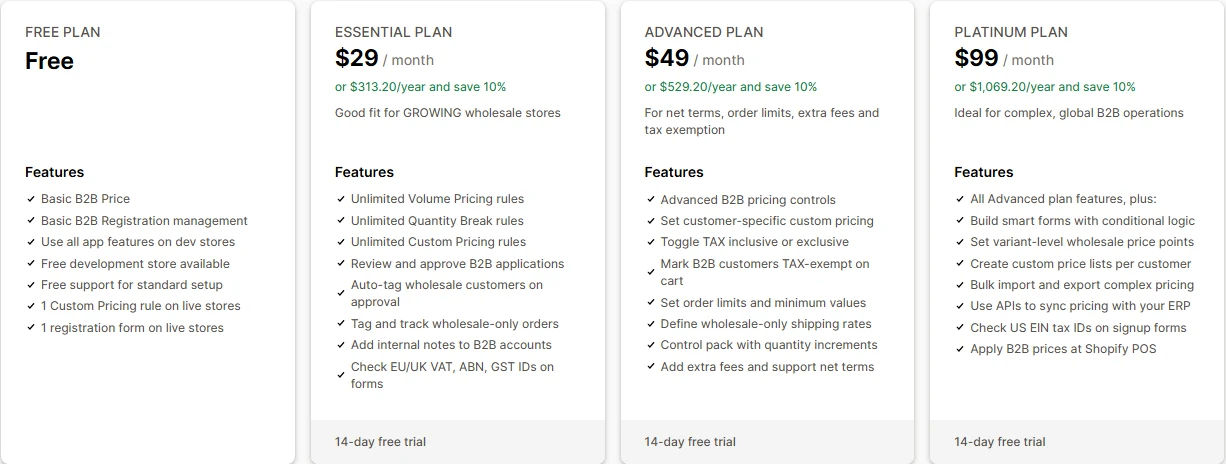
Plan | Per month | Per year | What it adds |
|---|---|---|---|
Free | $0 | $0 | 1 custom pricing rule and 1 signup form on a live store |
Essential | $29 | $313.20 | Unlimited pricing and quantity break rules, application review, tax ID checks |
Advanced | $49 | $529.20 | Net terms, order limits, quantity increments, tax exemption, currency display |
Platinum | $99 | $1,069.20 | Variant-level and per-customer price lists, Shopify POS pricing, public API |
Which Plan You'll Land On
- Essential if you only need group pricing and quantity breaks.
- Advanced as soon as a buyer wants to pay on terms or you need order minimums. For most trade stores, this is the real starting plan.
- Platinum if you negotiate prices retailer by retailer or sell wholesale in person.
The Two Apps Most Stores Add
- BSS B2B Lock hides prices and products from guests. Its free plan only locks your entire store, and paid plans are priced by your Shopify plan, not by the features you use. A store on Basic Shopify pays $9.99 a month, while one on Advanced Shopify pays $49.99 for the same price-hiding feature.
- BSS B2B Quote handles quote requests and quick order pages. There’s no free plan. Growth costs $19 a month but limits you to 5 quote logics; unlimited quotes start with Business at $39.
What a Full Setup Costs
Your setup | Apps and plans | Per month |
|---|---|---|
Net terms and hidden prices, on Basic Shopify | Advanced + Lock Basic | $58.99 |
The same, plus quote requests | Advanced + Lock Basic + Quote Growth | $77.99 |
Everything, on Advanced Shopify | Platinum + Lock Advanced + Quote Business | $187.99 |
Watch the renewals, too. The three apps have different trials (14, 7, and 14 days) and yearly discounts (10%, 20%, and 15%), so you’ll manage three billing cycles.
One way to avoid paying while you set things up: every BSS B2B Wholesale Pricing feature is free on development and test stores. I’d build your full setup on a test store first, then choose a plan once you know which modules you’ll use.
Who BSS B2B Wholesale Pricing Is Built For (And Who Should Look Elsewhere)
BSS suits stores that want detailed B2B controls and are comfortable with an app that works inside their theme. It’s a less suitable fit if the theme or app setup is fragile, or if you’d rather keep everything on one bill.
Who It's Built For
- Trade sellers in the EU or Australia. Sign-up checks VAT and ABN numbers, and a valid VAT ID in the cart creates a tax-exempt order.
- Stores on a standard theme with few other apps. That’s the setup most happy reviewers describe, with less room for code conflicts.
- Merchants who want precise pricing control. You choose fixed or percentage prices and set a clear order for which rule takes priority when they overlap.
- Teams that take orders by phone or email. You can create the order in your admin with the buyer's price, payment terms, and tax status already applied.
- Stores that want hands-on support. Reviewers describe support staff who stay with an issue, and one merchant had a missing feature built for them.
Who Should Look Elsewhere
If any of these describe your store, BSS may take more time or money than it’s worth.
- You run a custom theme or several apps that change prices or the cart. That’s when BSS’s code is most likely to conflict and break pages.
- Your overseas buyers need to pay in their own currency. BSS converts prices for display, but checkout stays in your store currency.
- You want pricing, hidden prices, and quotes in one app. With BSS, those are three apps, with three plans and three renewals.
- You run BOGO offers alongside net terms. BSS says its older BOGO module doesn't work reliably with Net Terms.
- You need a price list for each retailer but don't want the top plan. Per-customer price lists are only available on Platinum.
Best BSS B2B Wholesale Pricing Alternative: BMT
The reviews in this post kept coming back to two costs of running BSS: the code it adds to your theme and the extra apps you need around it. If either has started costing you time or money, BMT B2B Wholesale Pricing is the alternative I’d consider.
Here’s how the two compare once you count BSS’s sister apps too:
Feature | BSS (with Lock and Quote) | BMT B2B Wholesale Pricing |
|---|---|---|
Apps to install and pay for | Up to 3 | 1 |
Prices by customer or tag | Every plan, 1 rule on Free | Every plan, 1 rule on Free |
Signup forms on the free plan | 1 | Unlimited |
Tax ID check at signup | Essential ($29) | Not listed |
Hidden prices for guests | B2B Lock, $9.99 to $79.99 by Shopify plan | Standard ($9.99) |
Order minimums | Advanced ($49) | Standard ($9.99) |
Case packs and quantity increments | Advanced ($49) | Advanced ($29.99) |
Net terms | Advanced ($49) | Advanced ($29.99) |
Quote requests | B2B Quote, from $19 | Advanced ($29.99) |
Quick order form | B2B Quote, from $19 | Advanced ($29.99) |
Bulk order uploads by CSV | B2B Quote Business ($39) | 50 a month on Free, unlimited on Standard ($9.99) |
Shipping and payment methods per buyer group | Shipping rates only | Advanced ($29.99) |
Automatic invoices | Not listed | Expert ($49.99) |
Prices in the buyer’s currency | Display only, Advanced ($49) | Real per-market prices, Standard ($9.99) |
Per-customer prices | Platinum ($99) | Via a per-customer tag, Standard ($9.99) |
Shopify POS pricing | Platinum ($99) | Expert ($49.99) |
Free trial | 14 days (7 on Lock) | 60 days on paid plans |
What You Gain by Moving to BMT
1. The same setup costs a fraction of the price
Take the three BSS setups priced earlier in this review and run them on BMT instead:
Your setup | BSS, per month | BMT, per month |
|---|---|---|
Net terms and hidden prices | $58.99 | $29.99 |
The same, plus quote requests | $77.99 | $29.99 |
Everything, including per-customer prices and POS | $187.99 | $49.99 |
The full setup saves you $138 a month, or $1,656 a year on monthly billing. BMT’s price also doesn’t rise with your Shopify plan, unlike BSS B2B Lock.
2. Guests stop seeing your prices without a second app
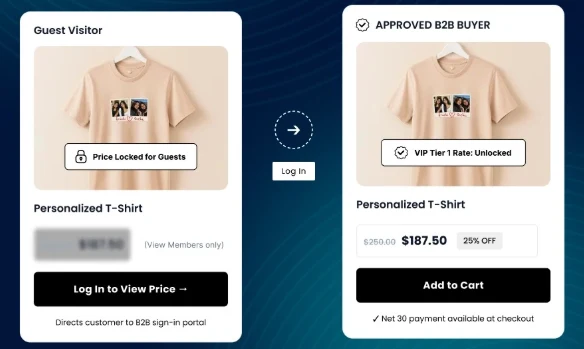
On BSS, hiding prices takes BSS B2B Lock, priced by your Shopify plan. On BMT, it’s part of the Standard plan. Guests see a login prompt, and you choose which products, collections or pages only approved buyers can open.
3. Every kind of buyer can apply from day one
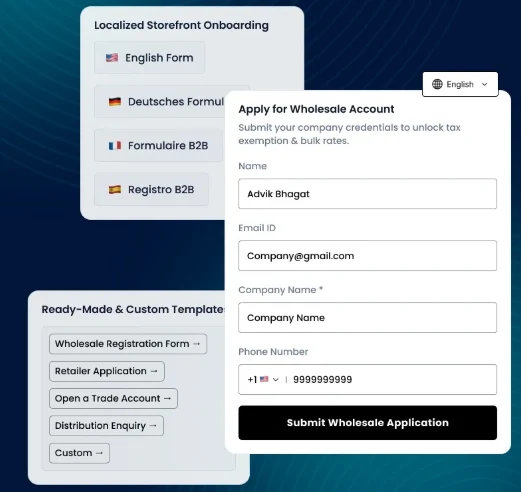
BSS’s free plan allows one signup form on a live store. BMT’s Free plan includes unlimited forms, so distributors and retailers can each get a form that asks the right questions, and you approve them by hand, or automatically from Standard ($9.99).
4. Order rules start on a cheaper plan
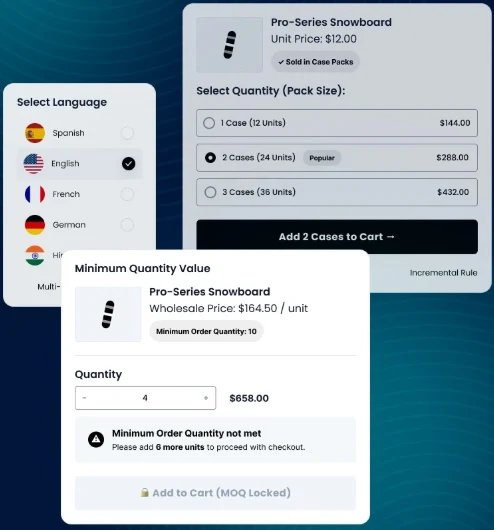
BSS puts order minimums and quantity increments on its $49 Advanced plan. BMT includes minimum quantities and order values on Standard at $9.99, and case-pack multiples on Advanced at $29.99.
5. Quotes and quick ordering live in the same app as your prices
On BSS, both sit in BSS B2B Quote, where the $19 plan caps you at 5 quote logics and bulk uploads need the $39 plan.
On BMT, a buyer’s quote request is priced from the rules you already set, and you turn it into a draft order in one step. Repeat buyers can reorder from a quick order form or upload a CSV or Excel file.
6. Pay-later terms cost less and come with invoicing
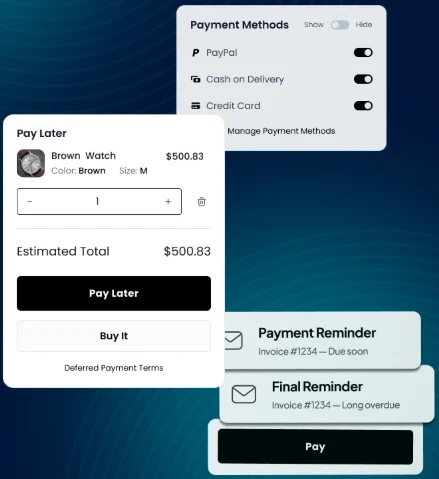
Net terms start at $49 on BSS and $29.99 on BMT. On the Expert plan, BMT also creates invoices, emails them automatically and keeps a copy in Google Drive, a step BSS leaves to you.
7. Overseas buyers see the price you actually agreed
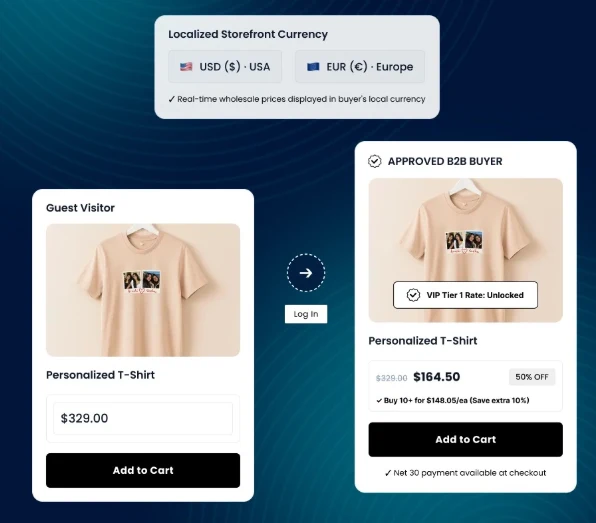
BSS converts prices at Shopify’s exchange rate for display, and the charge stays in your store currency. BMT lets you set a separate wholesale price for each Shopify Market, in that market’s own currency.
8. You control checkout, not just shipping rates
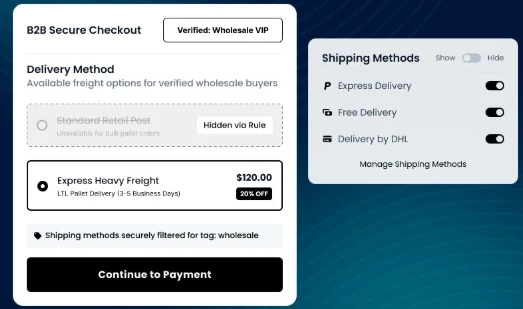
BSS can add a wholesale shipping rate by tag. BMT also lets you choose which shipping and payment methods each buyer group sees, so trade buyers get your freight options and a Pay later button on the cart while retail shoppers see your normal checkout.
Per-customer prices follow the same pattern. BSS keeps them on Platinum at $99, while on BMT’s $9.99 Standard plan you can give a customer their own tag and price it with unlimited rules. POS pricing is on Expert at $49.99.
Unconditional Support When You Need It
BSS’s reviewers praise its support, so this matters: you don’t give that up by moving. BMT includes 24/7 live chat and a free 30-minute setup session on every plan, including Free. Here’s what its merchants say:
- Fan Hub: “This app completely solved my wholesale pricing issues. The team is very professional, responds quickly, and is always helpful.”

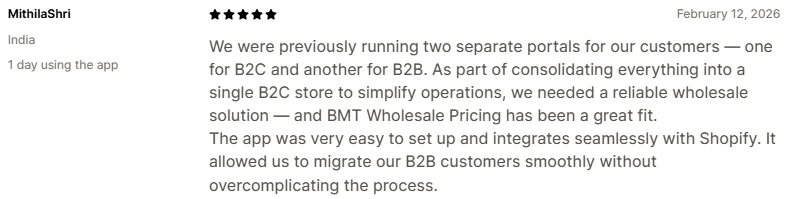
- MithilaShri went from separate B2C and B2B portals to one store: “The app was very easy to set up and integrates seamlessly with Shopify.”
- Smoking Cat Distribution moved to BMT after another wholesale app went down: “More features, lower cost.”

If clashes with other apps are your worry, BMT lists compatibility with Klaviyo, bundle, search, filter and page builder apps. It also holds the Built for Shopify badge and a 5.0 rating on the Shopify App Store.
Is BSS B2B Wholesale Pricing Worth It in 2026?
As a pricing tool, yes. Few Shopify apps give you this much control over each buyer's price, how they sign up, and when they pay.
As a complete wholesale system, I’d say no. You’d have BSS at the center with other pieces added around it, and you’d have to maintain those pieces for as long as you sell wholesale.
So the answer depends on what you’re building. If you want a strong pricing layer and are comfortable managing the rest yourself, BSS is a solid pick. If you want to set up your trade store once and run it from one place, I’d choose BMT B2B Wholesale Pricing.
BMT's 60-day free trial is four times longer than BSS's 14-day trial, giving you time to run real trade orders through it before paying.
Start your 60-day free trial, and BMT's team will set it up in about 30 minutes, offer free migration support for your BSS rules, and keep your store live with 0% downtime during the switch.
Set it up in your store
Step-by-step guides for the features covered above.
- Enable wholesale pricing on Shopify
- Create wholesale pricing rules
- Create a wholesale registration form
- Set up a quick order form
Ready to grow your wholesale business?
Install on Shopify